Posts

Showing posts with the label linux

Malicious Linux commands to avoid

Warning: Don't run these commands on your machine. They can erase your valuable data or crash your machine. It is worthwhile to have basic knowledge about malicious commands in Linux.  Don't blindly run the commands instructed in websites or scripts downloaded from the internet. Just verify the contents of the script for any commands that can harm your computer. If you want to know what a command can do use the man pages if you are offline. You can get the information of a command by typing info <command name> in the terminal. Example:  info sudo If you are connected to the internet then type man <command name> in the terminal to get the updated documentation. Example:  man sudo Again, the following commands can heavily damage your OS. These are extremely dangerous and should not be attempted on any computer that has any physical connection to valuable data. 1.   COMMANDS THAT CAN DELETE FILES AND FOLDERS rm -rf / ...

ANTI-VIRUS FOR LINUX

Do I need to have an anti-virus software for Linux? Isn't Linux virus free? If it is virus free then why are some anti-virus software in the software-center? If you are an average user of Linux you might be having these questions. So, do we really need an anti-virus software installed? The answer is  'yes'  and ' no'.  Don't worry after reading this post you will know if you need an anti-virus for your Linux. There are viruses for most all platforms, they are just more common on Windows. You can actually run Windows without a virus scanner if you keep it patched and are really careful. If you are really careful and know what you are doing you can get away without a scanner. The fact of the matter is: viruses/worms take advantage of flaws or holes in the code. There are some viruses targeted on Linux platform. Linux and other UNIX platforms are regarded are well protected, but not immune to computer viruses.  It is said that Linux is not targeted because its low ...

Games for Linux - Lugaru HD

Image
LUGARU   Do you love playing games? If you are using Linux you might have been feeling bad about the scarcity of nice games in Linux. Well, here's a nice game for you! It's Lugaru, a game about a rabbit with combat skills. Lugaru is the first commercial game by Wolfire Games. Lugaru's main character is Turner, an anthropomorphic rabbit with curiously well developed combat skills. After seeing his family and friends murdered by wolf raiders he embarks on a quest of revenge, only to uncover a deeper plot that threatens the entire island. Using a wide variety of intuitive combat techniques, the player combats wolves and hostile rabbits across three different landscapes (grasslands, snow, desert). The game was released for Linux on August 26, 2005. The game has two modes: story mode and challenges mode. In the story mode you    will play as Turner to avenge his family and friends. In the challenges mode you will have 14 challenges. It involves the player progressing...

Coloured man pages!

Image
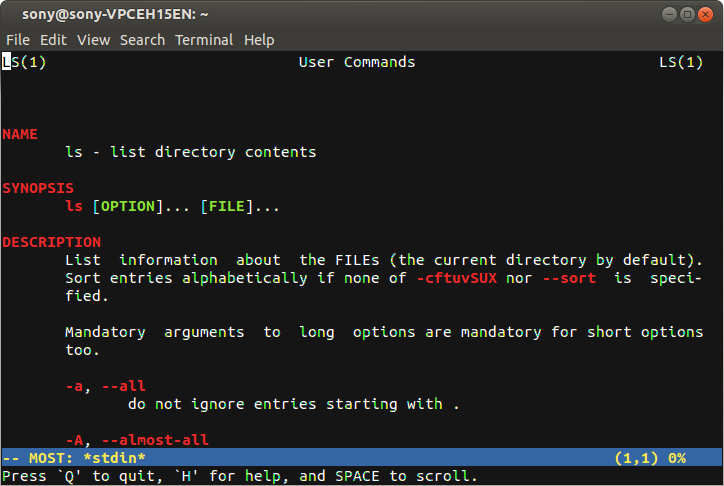
Are you bored from viewing monochrome(black & white) man pages?  Let's make the world a little bit colorful. coloured man page Colored man pages allow for a clearer presentation and easier digestion of the content. Let's see how to do it. Method 1: Open a terminal and type the following codes: sudo apt-get install most export PAGER="most" That's it now open your favorite man pages   and you will be awestruck to see colored man pages. Method 2:  This method has the advantage that  less  has a bigger feature set than  most , and is the default for viewing man pages. Add the following to a shell configuration file. All that needs to be done is to export bold and underline values of termcap. Adding the values to the  ~/.bashrc  will make sure that they are always used: # Less Colors for Man Pages export LESS_TERMCAP_mb=$'\E[01;31m' # begin blinking export LESS_TERMCAP_md=$'\E[01;38;5;74m' # begin bold export LESS_TERMCAP_me=$'\E[0m'...

Basic commands of Linux

Image
Linux has made a very good progress with the GUI (Graphical User Interface). But the traditional UNIX environment is a command-line interface (CLI) where you type the commands in a terminal. Mostly you can manage to do things using the GUI but if you want to become a power user or make your Linux powerful you must use the command-line. There are many varieties of Linux, but almost all of them use similar commands that can be entered from a command-line interface terminal. Opening a Terminal: To open a terminal in Ubuntu follow these steps: In Unity: Open dash and type terminal OR Dash -> More Apps -> Accessories -> Terminal In Gnome Open the activities and search for terminal OR Applications menu -> Accessories -> Terminal . You can also open a terminal by pressing CTRL+ALT+T keys. Now after opening the terminal let's get familiar with some commands. File & Directory Commands The tilde (~) symbol stands for your home directory. If you are user , then the t...