Posts

Showing posts with the label ubuntu

Malicious Linux commands to avoid

Warning: Don't run these commands on your machine. They can erase your valuable data or crash your machine. It is worthwhile to have basic knowledge about malicious commands in Linux.  Don't blindly run the commands instructed in websites or scripts downloaded from the internet. Just verify the contents of the script for any commands that can harm your computer. If you want to know what a command can do use the man pages if you are offline. You can get the information of a command by typing info <command name> in the terminal. Example:  info sudo If you are connected to the internet then type man <command name> in the terminal to get the updated documentation. Example:  man sudo Again, the following commands can heavily damage your OS. These are extremely dangerous and should not be attempted on any computer that has any physical connection to valuable data. 1.   COMMANDS THAT CAN DELETE FILES AND FOLDERS rm -rf / ...

ANTI-VIRUS FOR LINUX

Do I need to have an anti-virus software for Linux? Isn't Linux virus free? If it is virus free then why are some anti-virus software in the software-center? If you are an average user of Linux you might be having these questions. So, do we really need an anti-virus software installed? The answer is  'yes'  and ' no'.  Don't worry after reading this post you will know if you need an anti-virus for your Linux. There are viruses for most all platforms, they are just more common on Windows. You can actually run Windows without a virus scanner if you keep it patched and are really careful. If you are really careful and know what you are doing you can get away without a scanner. The fact of the matter is: viruses/worms take advantage of flaws or holes in the code. There are some viruses targeted on Linux platform. Linux and other UNIX platforms are regarded are well protected, but not immune to computer viruses.  It is said that Linux is not targeted because its low ...

INSTALLING JAVA IN UBUNTU

This post explains how to install Java in Ubuntu. You can install Iced tea java (open source) or the Oracle java. Installing Iced tea java is simple where as to install Oracle java you have to struggle a little with the command line. Let's get started. First I'll tell you how to install iced tea java and then we'll see how to install oracle java. 1. INSTALLING ICED TEA JAVA: Open a terminal by pressing  CTRL + ALT + T  keys or by searching for “terminal” in dash. Type the following to installed iced tea java on your machine. sudo apt-get install openjdk-7-jre icedtea-plugin That should install the java run time environment and the plugin for your browser. 2. INSTALLING ORACLE JAVA: To install oracle java you should first download the  32bit or 64bit Linux "compressed binary file" - it has a ".tar.gz" file extension.  Now we need to uncompress the file. Right click on the file and select “ extract here ”. OR you can do it the terminal way: tar -xvf jre-7-...

INSTALLING FLASHPLAYER IN UBUNTU

Image
Adobe® Flash® Player is a lightweight browser plug-in and rich Internet application runtime that delivers consistent and engaging user experiences, stunning audio/video playback, and exciting gameplay.   Note:  Adobe Flash Player 11.2 will be the last version to target Linux as a supported platform. Adobe will continue to provide security backports to Flash Player 11.2 for Linux. To install Adobe Flash player in your Ubuntu follow these steps: Open a terminal by pressing  CTRL + ALT+ T  keys and type the following: sudo add-apt-repository ppa:sparkers/ppa Then type sudo apt-get update After that type the following to install Lightspark: sudo apt-get install lightspark browser-plugin-lightspark You can use Google chrome which has Flashplayer installed by default

BLENDER FOR UBUNTU

Blender is a powerful and free 3D graphics tool used by designers and artists worldwide.Blender is an integrated 3d suite for modelling, animation, rendering, post-production, interactive creation and playback (games). Blender has its own particular user interface, which is implemented entirely in OpenGL and designed with speed in mind. Blender was first conceived in December 1993 and became a usable product in August 1994 as an integrated application that enables the creation of a diverse range of 2D and 3D content. Blender provides a broad spectrum of modeling, texturing, lighting, animation and video post-processing functionality in one package. Through its open architecture, Blender provides cross-platform interoperability, extensibility, an incredibly small footprint, and a tightly integrated workflow. Blender is one of the most popular Open Source 3D graphics applications in the world. Aimed at media professionals and artists world-wide, Blender can be used to create 3D visualiza...

Games for Linux - Lugaru HD

Image
LUGARU   Do you love playing games? If you are using Linux you might have been feeling bad about the scarcity of nice games in Linux. Well, here's a nice game for you! It's Lugaru, a game about a rabbit with combat skills. Lugaru is the first commercial game by Wolfire Games. Lugaru's main character is Turner, an anthropomorphic rabbit with curiously well developed combat skills. After seeing his family and friends murdered by wolf raiders he embarks on a quest of revenge, only to uncover a deeper plot that threatens the entire island. Using a wide variety of intuitive combat techniques, the player combats wolves and hostile rabbits across three different landscapes (grasslands, snow, desert). The game was released for Linux on August 26, 2005. The game has two modes: story mode and challenges mode. In the story mode you    will play as Turner to avenge his family and friends. In the challenges mode you will have 14 challenges. It involves the player progressing...

Coloured man pages!

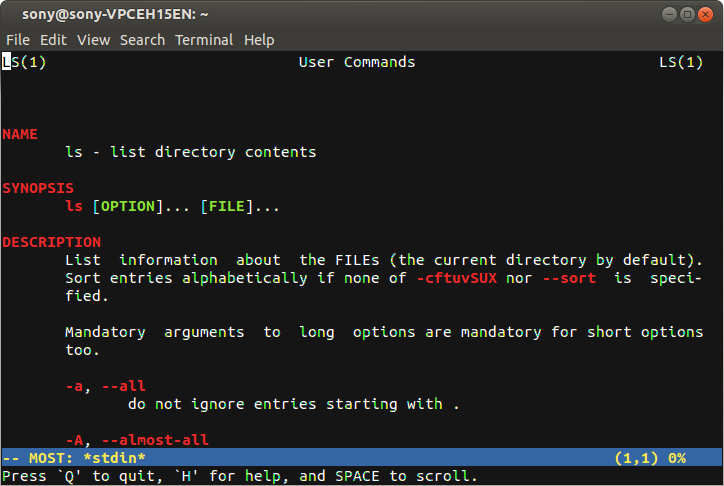
Image
Are you bored from viewing monochrome(black & white) man pages?  Let's make the world a little bit colorful. coloured man page Colored man pages allow for a clearer presentation and easier digestion of the content. Let's see how to do it. Method 1: Open a terminal and type the following codes: sudo apt-get install most export PAGER="most" That's it now open your favorite man pages   and you will be awestruck to see colored man pages. Method 2:  This method has the advantage that  less  has a bigger feature set than  most , and is the default for viewing man pages. Add the following to a shell configuration file. All that needs to be done is to export bold and underline values of termcap. Adding the values to the  ~/.bashrc  will make sure that they are always used: # Less Colors for Man Pages export LESS_TERMCAP_mb=$'\E[01;31m' # begin blinking export LESS_TERMCAP_md=$'\E[01;38;5;74m' # begin bold export LESS_TERMCAP_me=$'\E[0m'...

Games for linux - Ceferino

Image
Ceferino is a nice game with pretty decent graphics. It's a 2D game and it's available for ubuntu. The game is similar to 'Super Pang'. The story of the game is like this:   The cowboy Don Ceferino lived very happily in his quiet and modest house in the countryside,but one day he read in the newspaper that aliens were kidnapping all the cows around with no exception. The aliens arrived at the farm of Don Ceferino and kidnapped his only cow. But it doesn't end here. Don Ceferino is determined to recover his precious cow. Now it's your turn to help Don Ceferino. The controls are like this: Left Arrow - Move Left Right Arrow - Move Right x - Throw a knife z and c - Roll on the floor Up Arrow - Climb Stairs Down Arrow - Crouch  The game play is like this: You are attacked by little green balls which are bouncing around and which you have to destroy with your knife. Your knife, however, is limited to being thrown upwards, so you have to get under the balls to destroy...

How to install OpenVAS 7 in Ubuntu

OpenVAS is a framework of several services and tools offering a comprehensive and powerful vulnerability scanning and vulnerability management solution. This is a guide for installing OpenVAS in Ubuntu.  STEP 1: First we need to prepare our system for installation of OpenVAS. Open a terminal and type the following command: sudo apt-get install build-essential bison flex cmake pkg-config libglib2.0-0 libglib2.0-dev libgnutls26 libgnutls-dev libpcap0.8 libpcap0.8-dev libgpgme11 libgpgme11-dev doxygen libuuid1 uuid-dev sqlfairy xmltoman libsqlite3-0 libsqlite3-dev libxml2-dev libxslt1.1 libxslt1-dev xsltproc libmicrohttpd-dev libldap-2.4-2 libldap2-dev STEP 2: Now we need to download the OpenVAS source packages from the OpenVAS website. You can download it from the the website or you can use the terminal to download the files using the following commands:   mkdir openvas-src cd openvas-src/ wget http://wald.intevation.org/frs/download.php/1638/openvas-libraries-7.0...

Install windows after installing Ubuntu.

PROBLEM: Installing Ubuntu after installing Windows is easy. But installing Windows after installing Ubuntu removes my grub installation. How can we safely install windows after installing Ubuntu. SOLUTION: Here's what we should do: Make space for windows. Install windows. Reinstall GRUB. Install the boot loader MAKING SPACE FOR WINDOWS:               Open Gparted and make a partition for windows according to your requirements.  Make note of current  /boot  device. If that doesn't show up there, make note of the  /  device. The device name is something like  sda5 . You can install Gparted using the following commands: sudo apt-get install gparted  OR you can use Gparted in your live Ubuntu CD. INSTALL WINDOWS: Just install windows into the space (partition) that you've made in the previous step. REINSTALL GRUB: Now load your Ubuntu live CD. Open a terminal in the live session and enter the following commands: If you d...